编译与链接 - ELF 文件
在 Linux 上学习编译与链接等知识必然绕不开 ELF (Executable and Linkable Format) 文件,因为目标文件、可执行文件、动态库、coredump 等文件的格式均为 ELF,了解 ELF 的细节可以帮助你更容易地理解编译、链接、调试等方面方面的概念。
目标文件
目标文件是由编译器、汇编器或链接器构造,是用来组织机器指令与指令涉及到的数据的文件。链接器基于目标文件构造可执行程序或者动态库,装载器将目标文件载入内存以构造运行的进程。在不同的平台上,目标文件有不同的格式,比如 Windows 上 PE(Portable Executable),Linux 上 ELF(Executable Linkable Format)。
目标文件是编译、链接、装载的主要参与者,了解目标文件的格式有助于理解编译、链接、装载的实现细节。在学习网络的时候,我们必须了解 IP 与 TCP 等协议的头部信息,而在学习编译、链接、装载的时候,我们则必须了解目标文件格式,在 Linux 平台上则是了解 ELF 的格式。
ELF 文件的宏观结构
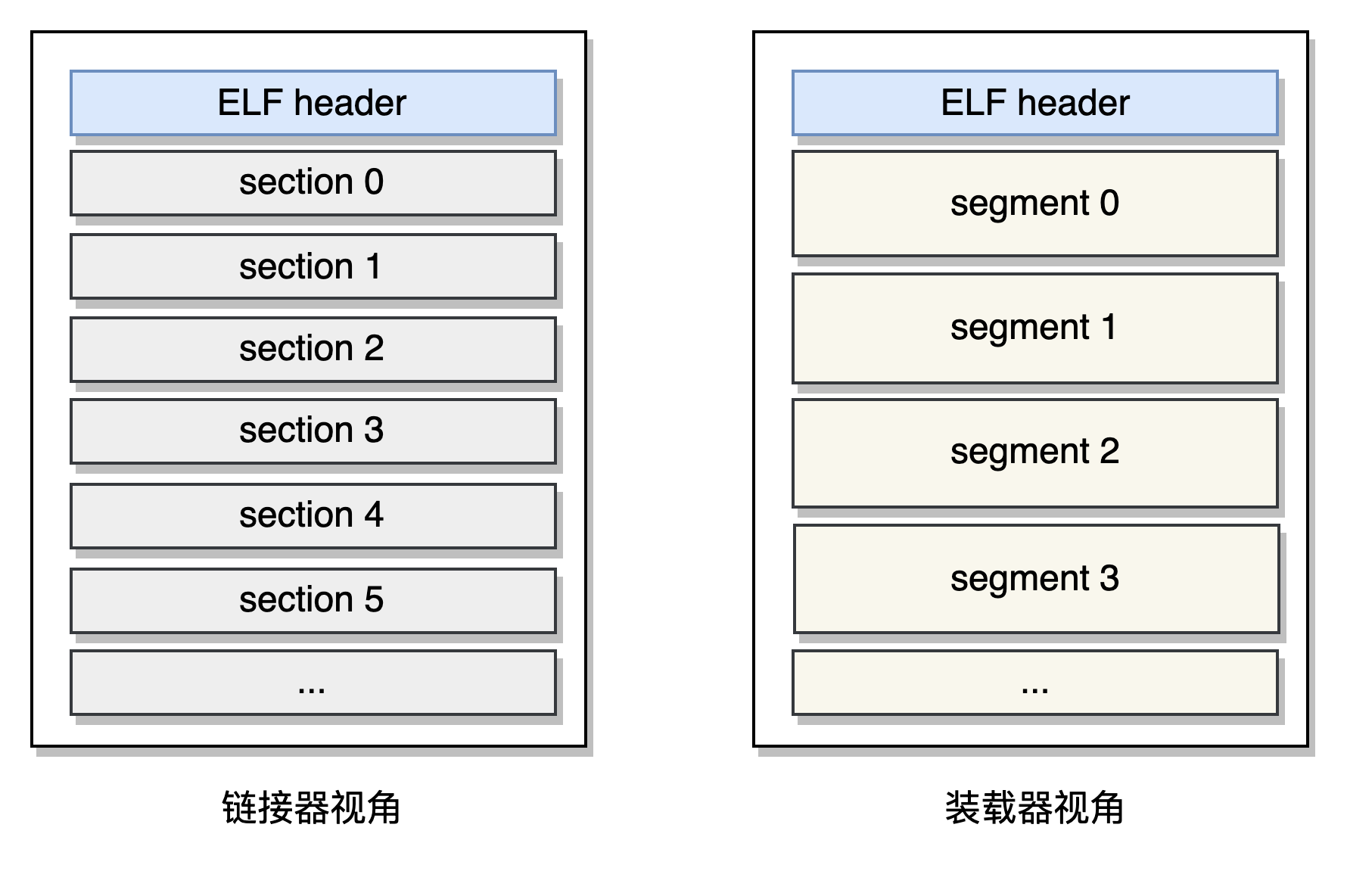
ELF 文件由一个头部和多个 section 构成,头部为元信息,各个 section 中存储不同类别的信息,比如 .text 中存储指令,.data 中存储数据,.bss 中存储为初始化的数据。对于可执行文件和动态库,它们需要被加载到内存中,对应的 ELF 文件中存在多个段(segment),这些 segment 告诉装载器如何加载 ELF 到内存中。section 和 segment 并非单独存在,一个 segment 在 ELF 文件中的范围一般包含一个或多个 section,不过也存在一些 segment 不包含任何 section。
对于链接器而言,它关注的是 ELF 文件中的各个 section,链接器会按照某些规则对多个目标文件中的 section 进行整合,最终生成可执行文件或者动态库。 对于装载器而言,它关注的是 ELF 文件中的各个 segment,在执行程序时,装载器会将 ELF 文件中的某些段加载到内存中。
下面分别是链接器和装载器视角下的 ELF 文件:
ELF 文件的结构体描述
ELF 文件中,包含头信息,也包含所有的 section 和 segment 信息。观察 ELF 文件的一种直观方式是使用 dumpelf 命令。使用最简单的 hello world 程序,编译产生一个目标文件,然后使用 dumpelf 来分析其结构:
$ gcc -c hello.c -o hello.o
$ dumpelf hello.o
执行 dumpelf hello.o 命令后会打印一段 C 语言代码,内容如下:
#include <elf.h>

/*
 * ELF dump of 'hello.o'
 *     1472 (0x5C0) bytes
 */

struct {
        Elf64_Ehdr ehdr;
        Elf64_Phdr phdrs[0];
        Elf64_Shdr shdrs[13];
} dumpedelf_0 = {
	.ehdr = {
        .e_ident = { /* (EI_NIDENT bytes) */
                /* [0] EI_MAG:        */ 0x7F,'E','L','F',
                /* [4] EI_CLASS:      */ 2 , /* (ELFCLASS64) */
                /* [5] EI_DATA:       */ 1 , /* (ELFDATA2LSB) */
                /* [6] EI_VERSION:    */ 1 , /* (EV_CURRENT) */
                /* [7] EI_OSABI:      */ 0 , /* (ELFOSABI_NONE) */
                /* [8] EI_ABIVERSION: */ 0 ,
                /* [9] EI_PAD:        */ 0x00 /* x 7 bytes */
        },
        .e_type      = 1          , /* (ET_REL) */
        .e_machine   = 62         , /* (EM_X86_64) */
        .e_version   = 1          ,
        .e_entry     = 0x0        ,
        .e_phoff     = 0          , /* (bytes into file) */
        .e_shoff     = 640        , /* (bytes into file) */
        .e_flags     = 0x0        ,
        .e_ehsize    = 64         , /* (bytes) */
        .e_phentsize = 0          , /* (bytes) */
        .e_phnum     = 0          , /* (program headers) */
        .e_shentsize = 64         , /* (bytes) */
        .e_shnum     = 13         , /* (section headers) */
        .e_shstrndx  = 12
	},
	.phdrs = {
	 /* no program headers ! */
	},

	.shdrs = {
		/* Section Header #0 '' 0x280 */
		{
		        .sh_name      = 0          ,
		        .sh_type      = 0          , /* [SHT_NULL] */
		        .sh_flags     = 0          ,
		        .sh_addr      = 0x0        ,
		        .sh_offset    = 0          , /* (bytes) */
		        .sh_size      = 0          , /* (bytes) */
		        .sh_link      = 0          ,
		        .sh_info      = 0          ,
		        .sh_addralign = 0          ,
		        .sh_entsize   = 0
		},
		/* Section Header #1 '.text' 0x2C0 */
		{
		        .sh_name      = 32         ,
		        .sh_type      = 1          , /* [SHT_PROGBITS] */
		        .sh_flags     = 6          ,
		        .sh_addr      = 0x0        ,
		        .sh_offset    = 64         , /* (bytes) */
		        .sh_size      = 21         , /* (bytes) */
		        .sh_link      = 0          ,
		        .sh_info      = 0          ,
		        .sh_addralign = 1          ,
		        .sh_entsize   = 0
		},
		// ...
	}
};
代码中定义个一个结构体,该结构体就是对 ELF 文件的描述,可以看到它由头部、section 列表、segment 列表构成,关于这三部分,后面会详细介绍。
ELF 文件头部
64 位的 ELF 文件的头部可以使用定义于 elf.h 中的 Elf64_Ehdr 结构体表示,该结构体定义如下:
#define EI_NIDENT (16)

typedef struct
{
  unsigned char	e_ident[EI_NIDENT];	/* Magic number and other info */
  Elf32_Half	e_type;			  /* Object file type */
  Elf32_Half	e_machine;		/* Architecture */
  Elf32_Word	e_version;		/* Object file version */
  Elf32_Addr	e_entry;		  /* Entry point virtual address */
  Elf32_Off	e_phoff;		/* Program header table file offset */
  Elf32_Off	e_shoff;		/* Section header table file offset */
  Elf32_Word	e_flags;		  /* Processor-specific flags */
  Elf32_Half	e_ehsize;		  /* ELF header size in bytes */
  Elf32_Half	e_phentsize;	/* Program header table entry size */
  Elf32_Half	e_phnum;		  /* Program header table entry count */
  Elf32_Half	e_shentsize;	/* Section header table entry size */
  Elf32_Half	e_shnum;		  /* Section header table entry count */
  Elf32_Half	e_shstrndx;		/* Section header string table index */
} Elf32_Ehdr;
使用 readelf -h 可以查看一个目标文件的头部信息:
$ readelf -h hello.o
ELF Header:
  Magic:   7f 45 4c 46 02 01 01 00 00 00 00 00 00 00 00 00
  Class:                             ELF64
  Data:                              2's complement, little endian
  Version:                           1 (current)
  OS/ABI:                            UNIX - System V
  ABI Version:                       0
  Type:                              REL (Relocatable file)
  Machine:                           Advanced Micro Devices X86-64
  Version:                           0x1
  Entry point address:               0x0
  Start of program headers:          0 (bytes into file)
  Start of section headers:          640 (bytes into file)
  Flags:                             0x0
  Size of this header:               64 (bytes)
  Size of program headers:           0 (bytes)
  Number of program headers:         0
  Size of section headers:           64 (bytes)
  Number of section headers:         13
  Section header string table index: 12
头部信息中有 ELF 文件的基本信息,重要的字段说明如下:
e_type:ELF 文件类型,可取值为 REL、EXEC、DYN、CORE,分别表示可重定位文件、可执行文件、动态链接库、coredumpe_phoff:program header table 在 ELF 文件中的偏移量,这里 program header 后文常常描述为 segment header。e_shoff:section header table 在 ELF 文件中的偏移量。
因为 ELF 的头信息在偏移量为 0 的地方,打开文件后可以解析出 Elf64_Ehdr 结构,然后通过 Elf64_Ehdr 结构中的 e_phoff 和 e_shoff 字段就可以进一步在 ELF 文件中读取出 phdrs 和 shdrs 两个字段。通过 phdrs 和 shdrs 就可以从 ELF 文件中读取全部的 section 的 segment 了。
Sections
ELF 文件中包含多个 section,这些 section 由 shdrs 描述,在 ELF 文件头部信息中 e_shoff 字段指出 shdrs 在 ELF 文件中的偏移量。shdrs 中的元素类型为 Elf64_Shdr,其定义如下:
typedef struct
{
  Elf64_Word	sh_name;		/* Section name (string tbl index) */
  Elf64_Word	sh_type;		/* Section type */
  Elf64_Xword	sh_flags;		/* Section flags */
  Elf64_Addr	sh_addr;		/* Section virtual addr at execution */
  Elf64_Off	sh_offset;	/* Section file offset */
  Elf64_Xword	sh_size;		/* Section size in bytes */
  Elf64_Word	sh_link;		/* Link to another section */
  Elf64_Word	sh_info;		/* Additional section information */
  Elf64_Xword	sh_addralign;	/* Section alignment */
  Elf64_Xword	sh_entsize;		/* Entry size if section holds table */
} Elf64_Shdr;
使用 readelf -S 命令可以查看当前 ELF 文件中的所有 section,下面是个例子:
$ readelf -S hello.o
There are 13 section headers, starting at offset 0x280:

Section Headers:
  [Nr] Name              Type             Address           Offset
       Size              EntSize          Flags  Link  Info  Align
  [ 0]                   NULL             0000000000000000  00000000
       0000000000000000  0000000000000000           0     0     0
  [ 1] .text             PROGBITS         0000000000000000  00000040
       0000000000000015  0000000000000000  AX       0     0     1
  [ 2] .rela.text        RELA             0000000000000000  000001d0
       0000000000000030  0000000000000018   I      10     1     8
  [ 3] .data             PROGBITS         0000000000000000  00000055
       0000000000000000  0000000000000000  WA       0     0     1
  [ 4] .bss              NOBITS           0000000000000000  00000055
       0000000000000000  0000000000000000  WA       0     0     1
  [ 5] .rodata           PROGBITS         0000000000000000  00000055
       000000000000000c  0000000000000000   A       0     0     1
  [ 6] .comment          PROGBITS         0000000000000000  00000061
       0000000000000012  0000000000000001  MS       0     0     1
  [ 7] .note.GNU-stack   PROGBITS         0000000000000000  00000073
       0000000000000000  0000000000000000           0     0     1
  [ 8] .eh_frame         PROGBITS         0000000000000000  00000078
       0000000000000038  0000000000000000   A       0     0     8
  [ 9] .rela.eh_frame    RELA             0000000000000000  00000200
       0000000000000018  0000000000000018   I      10     8     8
  [10] .symtab           SYMTAB           0000000000000000  000000b0
       0000000000000108  0000000000000018          11     9     8
  [11] .strtab           STRTAB           0000000000000000  000001b8
       0000000000000013  0000000000000000           0     0     1
  [12] .shstrtab         STRTAB           0000000000000000  00000218
       0000000000000061  0000000000000000           0     0     1
Key to Flags:
  W (write), A (alloc), X (execute), M (merge), S (strings), I (info),
  L (link order), O (extra OS processing required), G (group), T (TLS),
  C (compressed), x (unknown), o (OS specific), E (exclude),
  l (large), p (processor specific)
下面是对 section header 各个字段的解释:
sh_name:section 的名称,是一个指向符号表中对应字符串的 indexsh_type:当前 section 的类型,在elf.h中定义了一组以SHT_开头的宏,列举了已知的 section 类型- SHT_UNDEF: 一个为定义的 section
- SHT_PROGBITS: 定义于当前目标文件中的 section
- SHT_SYMTAB, SHT_DYNSYM: 符号表 (.symtab, .dynsym)
- SHT_STRTAB, SHT_DYNSTR: 字符串表 (.strtab, .dynstr)
- SHT_REL: 重定位表 (.rel.dyn, .rel.plt)
- SHT_RELA: 包含偏移量的重定位表 (.rela.dyn, .rela.plt)
- SHT_HASH: 哈希表 (.gnu.hash)
- SHT_DYNAMIC: 保存动态链接的信息 (.dynamic)
- SHT_NOBITS: 不占用磁盘空间的 section (.bss)
sh_flags:一些标记,在elf.h中定义了一组以SHF_开头的宏,给出了已知的 flag,常见的有SHF_WRITE表示该 section 可写,SHF_STRINGS表示该 section 中存放 null 结尾的字符串sh_addr:如果要将此 section 载入内存,则字段指定在虚拟地址空间中的位置sh_offset:当前 section 在 ELF 文件中的偏移量sh_size:当前 section 的大小sh_link:有的 section 和其他 section 存在依赖,此字段则用于指向依赖的 section。很多 section 中这个字段是 0,而观察 section header table 会发现 0 号 section 是一个 NULL 类型的 section。至于 link 指向的 section 和当前 section 有什么关系,这取决于当前 section 的类型。sh_info:当前 section 的额外信息,具体怎么解读取决于 section 类型。sh_addralign:section 的对齐偏移sh_entsize:某些 section 中包含的是固定大小的 entry,这个字段说明了单个 entry 的大小。
关于 section header 的详细介绍,推荐阅读 man elf 中的相关内容,以及 elf.h 头文件中的宏定义和注释。
Segments
可执行文件需要被加载到内存中才能运行,有的 section 仅在链接的时候使用,它们不需要被载入到内存中,还有的 section 比如 .text、.data,则需要被被载入到内存中。在可执行文件的 ELF 文件中,将多个 section 划分为 segment。在运行时,装载器以 segment 维度去加载 ELF 文件,并只会把需要加载的部分载入内存。
可以使用 readelf --segments 命令查看段信息:
$ readelf --segments ./hello

Elf file type is EXEC (Executable file)
Entry point 0x401070
There are 11 program headers, starting at offset 64

Program Headers:
  Type           Offset             VirtAddr           PhysAddr
                 FileSiz            MemSiz              Flags  Align
  PHDR           0x0000000000000040 0x0000000000400040 0x0000000000400040
                 0x0000000000000268 0x0000000000000268  R      0x8
  INTERP         0x00000000000002a8 0x00000000004002a8 0x00000000004002a8
                 0x0000000000000031 0x0000000000000031  R      0x1
      [Requesting program interpreter: /opt/compiler/gcc-8.2/lib64/ld-linux-x86-64.so.2]
  LOAD           0x0000000000000000 0x0000000000400000 0x0000000000400000
                 0x0000000000000458 0x0000000000000458  R      0x1000
  LOAD           0x0000000000001000 0x0000000000401000 0x0000000000401000
                 0x0000000000000272 0x0000000000000272  R E    0x1000
  LOAD           0x0000000000002000 0x0000000000402000 0x0000000000402000
                 0x0000000000000158 0x0000000000000158  R      0x1000
  LOAD           0x0000000000002e38 0x0000000000403e38 0x0000000000403e38
                 0x0000000000000200 0x0000000000000210  RW     0x1000
  DYNAMIC        0x0000000000002e58 0x0000000000403e58 0x0000000000403e58
                 0x00000000000001a0 0x00000000000001a0  RW     0x8
  NOTE           0x00000000000002dc 0x00000000004002dc 0x00000000004002dc
                 0x0000000000000020 0x0000000000000020  R      0x4
  GNU_EH_FRAME   0x0000000000002010 0x0000000000402010 0x0000000000402010
                 0x000000000000003c 0x000000000000003c  R      0x4
  GNU_STACK      0x0000000000000000 0x0000000000000000 0x0000000000000000
                 0x0000000000000000 0x0000000000000000  RW     0x10
  GNU_RELRO      0x0000000000002e38 0x0000000000403e38 0x0000000000403e38
                 0x00000000000001c8 0x00000000000001c8  R      0x1

 Section to Segment mapping:
  Segment Sections...
   00
   01     .interp
   02     .interp .note.ABI-tag .hash .gnu.hash .dynsym .dynstr .gnu.version .gnu.version_r .rela.dyn .rela.plt
   03     .init .plt .plt.got .text .fini
   04     .rodata .eh_frame_hdr .eh_frame
   05     .ctors .dtors .dynamic .got .got.plt .data .bss
   06     .dynamic
   07     .note.ABI-tag
   08     .eh_frame_hdr
   09
   10     .ctors .dtors .dynamic .got
对于可执行文件或者动态库文件,其 ELF 文件中包含多个 segment,segment 的元信息使用 Elf64_Ehdr 结构体描述,其定义如下:
typedef struct
{
  Elf64_Word	p_type;		/* Segment type */
  Elf64_Word	p_flags;		/* Segment flags */
  Elf64_Off	p_offset;		/* Segment file offset */
  Elf64_Addr	p_vaddr;		/* Segment virtual address */
  Elf64_Addr	p_paddr;		/* Segment physical address */
  Elf64_Xword	p_filesz;		/* Segment size in file */
  Elf64_Xword	p_memsz;		/* Segment size in memory */
  Elf64_Xword	p_align;		/* Segment alignment */
} Elf64_Phdr;
各个字段的含义说明如下:
p_type:段类型,下面是部分类型的说明:PT_LOAD:需要被加载到内存中的段PT_DYNAMIC:包含动态链接的信息的段PT_PHDR:program header table 自身
p_flags:一些 flag,详见elf.hp_offset:在 ELF 文件中的偏移量p_vaddr:被加载到内存中后,放置的位置p_paddr:物理地址p_filesz:段大小p_memsz:加载到内存中的大小,这个字段可以大于p_filesz,比如 .bss 部分因为都是 0,在磁盘上是没必要存储的,但是载入到内存中后,需要给它分配空间p_align:对齐量,有些 segemnt 在内存中需要对齐到某个大小
再次观察前面 readelf --segments 命令的输出,可以看到一个 Section to Segment mapping 的信息。
 Section to Segment mapping:
  Segment Sections...
   00
   01     .interp
   02     .interp .note.ABI-tag .hash .gnu.hash .dynsym .dynstr .gnu.version .gnu.version_r .rela.dyn .rela.plt
   03     .init .plt .plt.got .text .fini
   04     .rodata .eh_frame_hdr .eh_frame
   05     .ctors .dtors .dynamic .got .got.plt .data .bss
   06     .dynamic
   07     .note.ABI-tag
   08     .eh_frame_hdr
   09
   10     .ctors .dtors .dynamic .got
ELF 文件中 segment 并没有单独存在,如果你仔细观察 section 和 segment 的起始地址与大小,你会发现 segment 的范围与 section 是重合的,实际上一个 segment 可以包含 0 个或多个 section。
总结
本文从宏观上介绍了 ELF 文件的结构,但对 ELF 文件中不同的 section 和 segment 类型暂没有介绍。这些不同类型的 section 和 segment 各有各的用途,牵扯到的内容很多,我将在其他文章中结合静态链接、动态链接、符号重定位等等概念来介绍。