CUDA 005 - Element-wise
What is Element-wise?
Element-wise is a pattern in parallel computing, where each element of the data is processed independently. For example, adding two vectors element-by-element, absolute value operation, activation functions in neural networks, etc. In CUDA, this can be achieved by assigning each thread to process a single element of the data.
Simple Implementation
Implementing elementwise operations in CUDA is fairly straightforward. Here's a basic example of how to implement an elementwise operation in CUDA to perform an absolute value operation on a vector:
__global__ void elementwise_abs(float *x, size_t N) {
    auto idx = blockIdx.x * blockDim.x + threadIdx.x;
    if (idx < N) {
        x[idx] = std::abs(x[idx]);
    }
}
Fairly easy, indeed. This simple implementation can achieve very good performance. Actually, on my machine, all the other implementations of elementwise below have similar performance.
Multiple Elements per Thread
If the array has a large number of elements, a thread for each element requires launching a large number of thread blocks. Let's try to process multiple elements per thread.
There are two ways to process multiple elements per thread:
- each thread processing multiple consecutive elements, like
a[idx], a[idx+1], a[idx+2], ... - all threads processing multiple elements with a stride of grid size. For example, if we have 256 threads in a block, and we have 256 blocks, the grid size is
256 * 256elements. Then, each thread can processa[idx], a[idx+256*256], a[idx+256*256*2], ...
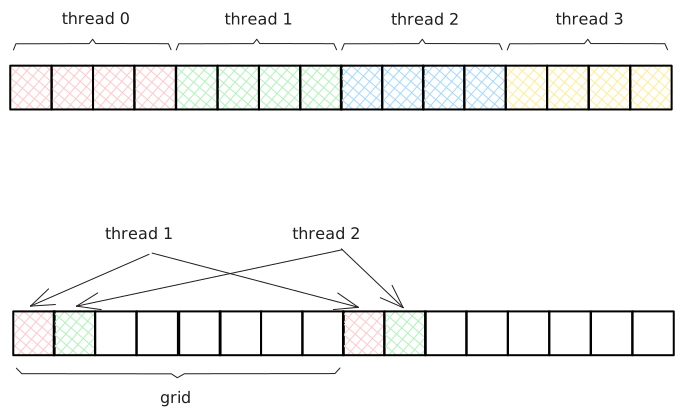
In the first way, threads in a warp read discontiguous memory, which is not coalesced. Multiple memory transactions are needed. But each thread will soon read the next element in the next iteration, and the elements are probably cached in the L1 cache.
template<typename T, int ELEMENT_PER_THREAD>
__global__ void elementwise_abs(T* x, size_t N) {
    auto idx = blockIdx.x * blockDim.x + threadIdx.x;
    idx *= ELEMENT_PER_THREAD;

    #pragma unroll
    for (int i = 0; i < ELEMENT_PER_THREAD; i++) {
        if (idx + i < N) {
            x[idx+i] = std::abs(x[idx+i]);
        }
    }
}
In the second way, threads in a warp read contiguous memory. Intuitively, it is better than the first way. But the grid size is unknown at compile time, you don't know how to unroll the loop.
template<typename T>
__global__ void elementwise(T* x, size_t N) {
    auto idx = blockIdx.x * blockDim.x + threadIdx.x;
    int grid_size = gridDim.x * blockDim.x;

    for (int i = 0; i < N; i += grid_size) {
        x[idx+i] = std::abs(x[idx+i]);
    }
}
Vectorized Memory Access
Vectorized memory access refers to the ability of loading multiple data elements from global memory with a single instruction. If you read a 32-bit (4B) float, the compiler will generate a 32-bit load instruction (LDG.E is SASS). If you read a 128-bit (16B) float4, the compiler will generate a 128-bit load instruction (LDG.E.128). Reading the same amount of data, vectorized memory access can reduce the number of instructions needed to perform data loading.
All you need to do is cast the pointer to float4 (for float) or int4 (for int) and divide the count of elements by the number of elements per vector.
auto f4 = reinterpret_cast<float4*>(nums);
elementwise<float4><<blocks, threads>>>(f4, N / 4);
Template
Elementwise kernels have similar patterns, so it's a good idea to write them as templates. All you need to do is iterating over all elements and apply the function to each element. If you want to do a certain operation to all elements, you can define a function and pass it to the elementwise kernel.
You may want to implement a elementwise kernel like this:
void abs(float *x) {
    *x = std::abs(*x);
}

template<typename T>
__global__ void elementwise(T *a, size_t N, void(*fn)(T *)) {
    auto idx = blockIdx.x * blockDim.x + threadIdx.x;
    if (idx < N) {
        fn(&a[idx]);
    }
}

elementwise<float><<<blocks, threads>>>(x, n, abs);
When you try to run this code, you will encounter an error like an illegal memory access was encountered. This is because you are passing the function address to GPU and trying to call it. When calling a host-side function on device side, this would cause an error.
If you want to pass a function to the kernel, you need to pass a functor (a class with overloaded operator()) at compile time. Here is one way to do it:
template<typename A, typename OP>
__global__ void elementwise(A *a, size_t N) {
    auto idx = blockIdx.x * blockDim.x + threadIdx.x;
    if (idx < N) {
        OP()(&a[idx]);
    }
}

template<typename T>
class Abs {
public:
    __device__ __forceinline__ void operator()(T* x) const {
        *x = std::abs(*x);
    }
};

elementwise<float, Abs<float>><<<blocks, threads>>>(x, n);
When compiling, the functor Abs will be instantiated and passed to kernel. After template instantiation, the kernel will look like this:
__global__ void elementwise(float *a, size_t N) {
    auto idx = blockIdx.x * blockDim.x + threadIdx.x;
    if (idx < N) {
        Abs()(&a[idx]);
    }
}
You can pass a functor (a class with overloaded operator()) to the template, and at compile time, it will be instantiated into a specific type of functor that can be used by the kernel. This avoids passing function pointers to the GPU during runtime.
A CUDA kernel can only invoke functions that are decorated with __device__, so you have to add the __device__ modifier for the functor's operator. Some standard library functions, like the one used in this example (std::abs), have special support from CUDA compilers and implement versions suitable for use on GPUs, which is why you can use std::abs directly in the functor.
Conclusion
Implementing elementwise kernels in CUDA is easy, you don't have many opportunities to go wrong. In this post, I've shown you how to implement a simple elementwise kernel and how to handle multi elements in a single thread. Elementwise is very common in CUDA programming, providing a generic elementwise function that can be used for any type of data and operation is very useful. I have demonstrated how to implement a template function to handle different types and operations. But in this post I did not cover how to handle multiple arguments. In that case, you have to define multiple template functions that take multiple arguments.
You can find the code in this post on Github.